 Simon
Simon
·
Dev Log DevKnife Update 1.14.0
DevKnife 1.14.0 adds Cron Inspector, URL Editor, source-code Quick Look previews, and several workflow refinements.
Read MoreFor developers, a reliable HTTP client is an essential tool. Whether you’re building a REST API, testing a GraphQL endpoint, or debugging a webhook, you need a capable API client to send and inspect HTTP requests. While there are many great tools out there, they often come with trade-offs—some are command-line based, others are heavy desktop apps, and some require an internet connection.

Making an HTTP request using the curl command in the terminal.
The go-to command-line tool for making HTTP requests. It’s incredibly powerful and flexible, but it can be cumbersome to write and rewrite complex requests in the terminal, making it a less-than-ideal REST client for complex jobs.
These are popular, feature-rich desktop applications for API testing. They are fantastic as dedicated API clients, managing large collections of requests and collaborating with a team. However, they can be overkill for a quick, one-off request and their performance can sometimes feel sluggish.
Web-based HTTP clients are convenient for simple requests, but they come with a major drawback: you have to send your request data—including sensitive information like API keys or auth tokens—to a third-party server.
Devknife includes a simple, yet powerful HTTP client designed for developers who need to make requests quickly and securely. It’s built right into the app, so you don’t need to install another tool or switch between different applications. Devknife’s HTTP client also functions as a highly capable API and REST client, ideal for various testing and debugging scenarios.
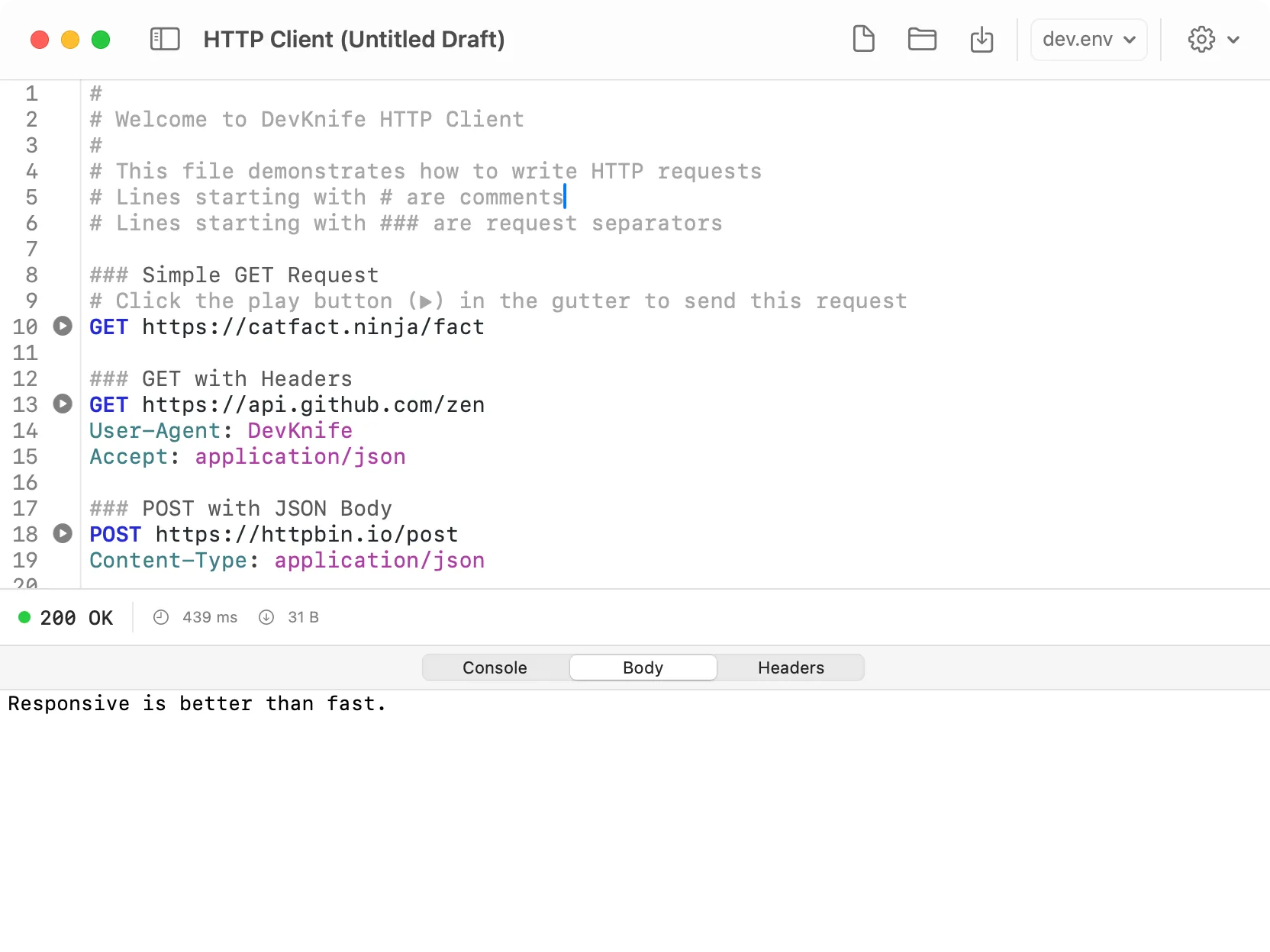
Devknife’s integrated HTTP client, showcasing its .http file editor where you define and run your API requests, and view the structured responses.
Devknife’s HTTP client is built around the versatile .http file format, providing a streamlined and powerful way to interact with APIs. Instead of a cumbersome graphical interface for building requests, you define your requests directly in a plain-text .http file, which Devknife then executes.
This approach offers significant advantages:
Authorization: Bearer {{token}}) in your .env file and reference them in your .http file without hardcoding them.To get started, simply open or create an .http file directly within Devknife’s integrated editor, define your requests, and run them instantly. The results, including status codes, headers, and formatted response bodies, will be displayed clearly within the application.
If you’re looking for a fast, private, and easy-to-use HTTP, API, and REST client for your Mac, give Devknife a try. It’s the perfect companion for any developer who values speed and simplicity.
DevKnife 1.14.0 adds Cron Inspector, URL Editor, source-code Quick Look previews, and several workflow refinements.
Read More
Fast, private, and built for macOS.